K
Kat
Guest
- Thread Author
- #1
What are your favorite organization tips as the school year gets underway? We’ve shared tips for preserving your kids’ artwork, as well as why I think a family email address is great for all working parents — but today I thought I’d explain an easy trick I’ve figured out for how to use your iPhone to organize school papers. (Android users, I’d love to hear your tips too!)
This is really a very easy organizing tip, but it took me some time to figure it out, so I thought I’d share. You know how you get all that paperwork at the start of the school year — the teacher’s first name! email address! the schedule for art lessons! the procedure for sick days! the days the kids get off! — and so forth? If you are me, you generally INTEND to file it away somewhere clever, but instead you move it from pile to pile (kitchen to dining table to windowsill) until it just becomes part of the paper floating around the house.
Instead, I’ve started taking snapshots of all of it and then sending it to iCloud Notes. You can create folders in iCloud Notes — I have one for each kid — and individual notes, and each time you get new information (whether in email, on paper, or whatever) you can just take a snapshot and add it to the existing note. For example, for my older son I have a folder with his initials and a notecard that says SECOND GRADE, and it contains the intro info from the teacher, the list of words they’re supposed to be able to read and spell, and other school pertinent school info, like the PIN if he wants to buy lunch at school.
How to Add Pictures and Documents from Within Your iPhone’s Notes
(Updated to add more images, hyperlinked below.)
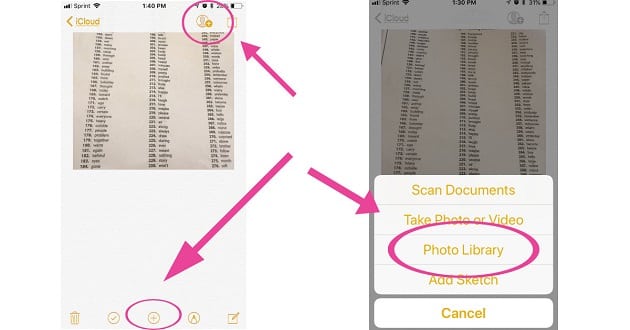
First, we’re talking about the yellow and white icon that says “Notes,” which become iCloud Notes if you choose to sync them with the cloud. You can create a new folder from the bottom of the notes page. Create a note within a folder, or open a note you’ve already started — tap the plus sign at the very bottom of the page, and then choose to add a photo from your photo library. (You can also just take a photo from this point if you prefer, or actually scan the document, which I think is more error-prone but does make the text searchable.)
Here’s another bonus for this system: By using the person icon at the top, you can add people to the notes, so if your partner or caregiver has an iPhone, they can have all this data at their fingertips as well. (Great for sharing parenting duties!)
How to Add Pictures to iCloud Notes from the Camera Album
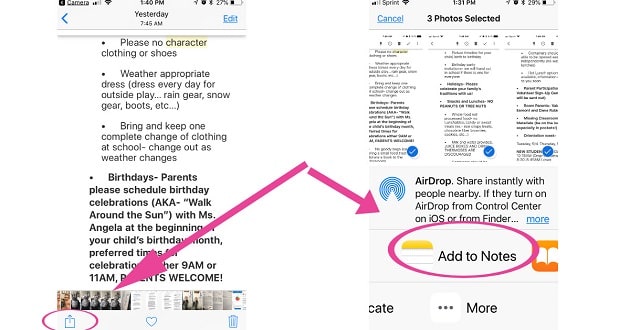
Choose the “share” icon, then select as many pictures as you want. On the top bar, there should be an option called “add to notes,” and from there you can choose to create a new note or add to an existing note.
(I suppose I could keep it in my Evernote system, but that feels more “permanent,” whereas this stuff feels more ephemeral.)
Ladies, how do you store this kind of school paperwork? Do you have any other easy organizing tips for the school year ahead? (Do you have any other great ways to use your iPhone to store school paperwork?)
Stock photo at top and on Pin via Stencil.
The post How to Use Your iPhone to Store School Paperwork appeared first on CorporetteMoms.